FlyNow.
A clearer path from search to take-off.
UX Designer · Research & prototyping
I explored how travellers compare fares, recognise connections and keep track of the flight they are choosing.
Original UX portfolio study · Research, synthesis, interaction design and a 74-state mobile prototype


The original story begins with the booking problem.
The project moves through research, analysis, concept and design—from understanding travellers to building a connected mobile prototype.
The animated opening is a later visual direction. I keep it separate so the original work, evidence and decisions remain clear.
Research: understand the booking experience.
The brief was to make airline booking easier to understand through a deeper knowledge of the people using it. Before designing a solution, I needed to see what travellers were trying to do, how existing services supported them and where those experiences became difficult.
I approached that through four pieces of research: a competitive benchmark, note-taking from usability sessions, an online survey, and my own interviews and usability tests.
Competitive benchmark
1 day · PowerPoint · 4 airlines
I chose American Airlines, Lufthansa, KLM and Ryanair. Comparing three European airlines with an American airline let me look for differences across markets; including a low-cost airline also brought a different booking model into the comparison.
I reviewed the home, search and results experiences, recording useful conventions alongside problems. Ryanair, the low-cost option, stood out to me for useful booking behaviours. Clear information and familiar behaviour were worth learning from as much as the things that needed to change.
This gave me a starting point for the research. My own judgement of an interface could not stand in for understanding the people booking flights.

Note-taking from usability sessions
I reviewed two recorded participants, each completing tasks with Aer Lingus and Eurowings. I wrote observations in the order they happened and colour-coded positive, negative and neutral moments, so the sequence and context stayed visible.
What helped: understandable layouts, familiar language and iconography, a visible indication of the current step, and clear signals that an option could be expanded.
What needed attention: unexplained icons, unclear presentation, inconsistent typography or colour cues, clutter, and processes that made it difficult to go back.
The notes also preserved behaviour and differences between participants. Both used the calendar to select departure and then return dates. Recognising an automatic transition to the return flight was easy for one person and less immediate for the other.

Online survey
3 days · SurveyMonkey · 26 responses overall
The survey widened the view beyond my own benchmark. I asked travellers about a recent visit to an airline website or app: what they wanted to achieve, their preferred booking channel, and the obstacles they remembered.
Nine questions covered the context of the visit as well as the outcome. The full results include successful experiences, so I kept those responses in the story instead of treating every visit as a failure.
The nine questions I asked
- When had they last visited an airline website or app?
- Why had they visited, and what task were they trying to complete—checking flights, comparing prices or checking in, for example?
- Had they completed that task?
- Did they book through an app or a website, and why?
- Did they prefer booking directly with an airline or through a flight-search service?
- Did they usually create an airline account?
- Had completing the task required excessive steps?
- Had the experience matched their expectations?
- What had been the biggest obstacle during the visit?

The survey did not describe universal booking failure.
19 / 25completed their task.Question 3
26 / 26reported no excessive steps.Question 7
22 / 26said the experience was as expected.Question 8
This small survey concerns existing airlines, not FlyNow validation. Question denominators vary. The reviewed sessions and my own interviews/tests are separate sources; their participant counts are not combined.
Usability testing and in-depth interviews
1 day · Zoom, ScreenFlow and Reflector 3 · 2 customers
After learning from the earlier research, I wanted to conduct sessions myself and hear directly from people using the service. I interviewed and usability-tested with two customers to understand their goals, behaviour and context of use.
This was a separate part of the research from reviewing the two recordings above. The still shows one of my original sessions; the recordings are available on request.
Across the research, the important questions were becoming more specific: how people chose dates, understood fares, followed the change from outbound to return, and balanced price against the timing of a flight.

Analysis: make sense of the evidence.
Collecting research left me with a large amount of information. I needed to organise it before I could clearly describe the problems the design should address.
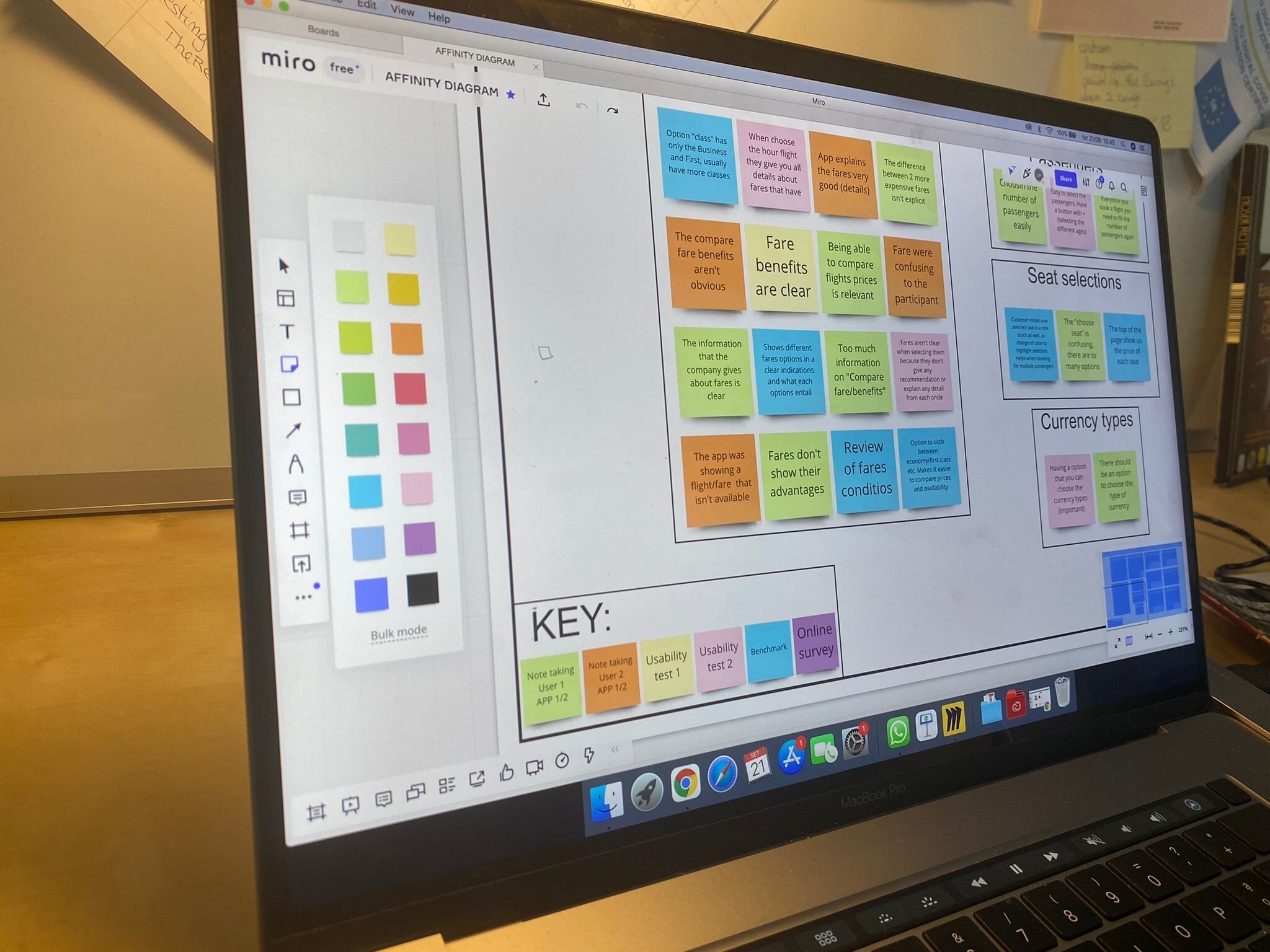
I worked through the material in a collaborative affinity-mapping session. Discussing and grouping the observations was part of the analysis itself, rather than simply arranging finished findings on a board.

Affinity diagram
3 days · Miro
I transferred important observations, participant comments and annotations into digital sticky notes. Each research source had its own colour, keeping benchmark findings, survey answers and individual sessions distinguishable as I organised related points into groups.
The groups covered fares, dates, airports, seats, totals and navigation. I retained the positive experiences as well as the difficulties: clear inclusions helped in one experience, while unexplained fare names confused travellers in another.
The diagram gave the research a structure I could use in the next step—placing those patterns within the booking journey.
Customer journey map
2 days · Miro · 9 journey stages
With the affinity diagram in place, I could see the booking process more clearly as a journey. I mapped nine stages, from deciding to travel through the booking summary.
For each stage, I documented goals, behaviour, context, positive experiences, pain points and mental models. I also represented the overriding emotion as positive, negative or neutral, using the research to show where the experience became easier or more difficult.
This connected a finding to the moment it mattered. Fare information, flight timing and the transition between outbound and return were decisions to support in context, rather than isolated interface details.

Concept: turn the findings into a booking flow.
Once I had analysed the research and understood the problems, I began defining the solution through two pieces of work: a mobile flow diagram and interaction sketches.
Flow diagram for mobile
1 day · Figma · A single booking use case
I created a linear flow for one use case, working out how the traveller would move through the booking. The aim was to retain familiar mental models while bringing the research recommendations into the sequence of decisions.
The original flow separates outbound and return choices. That mattered because one reviewed participant recognised the automatic transition to the return flight while the other did not immediately; the sketches then make each leg explicit through route and date labels.

Interaction design for mobile
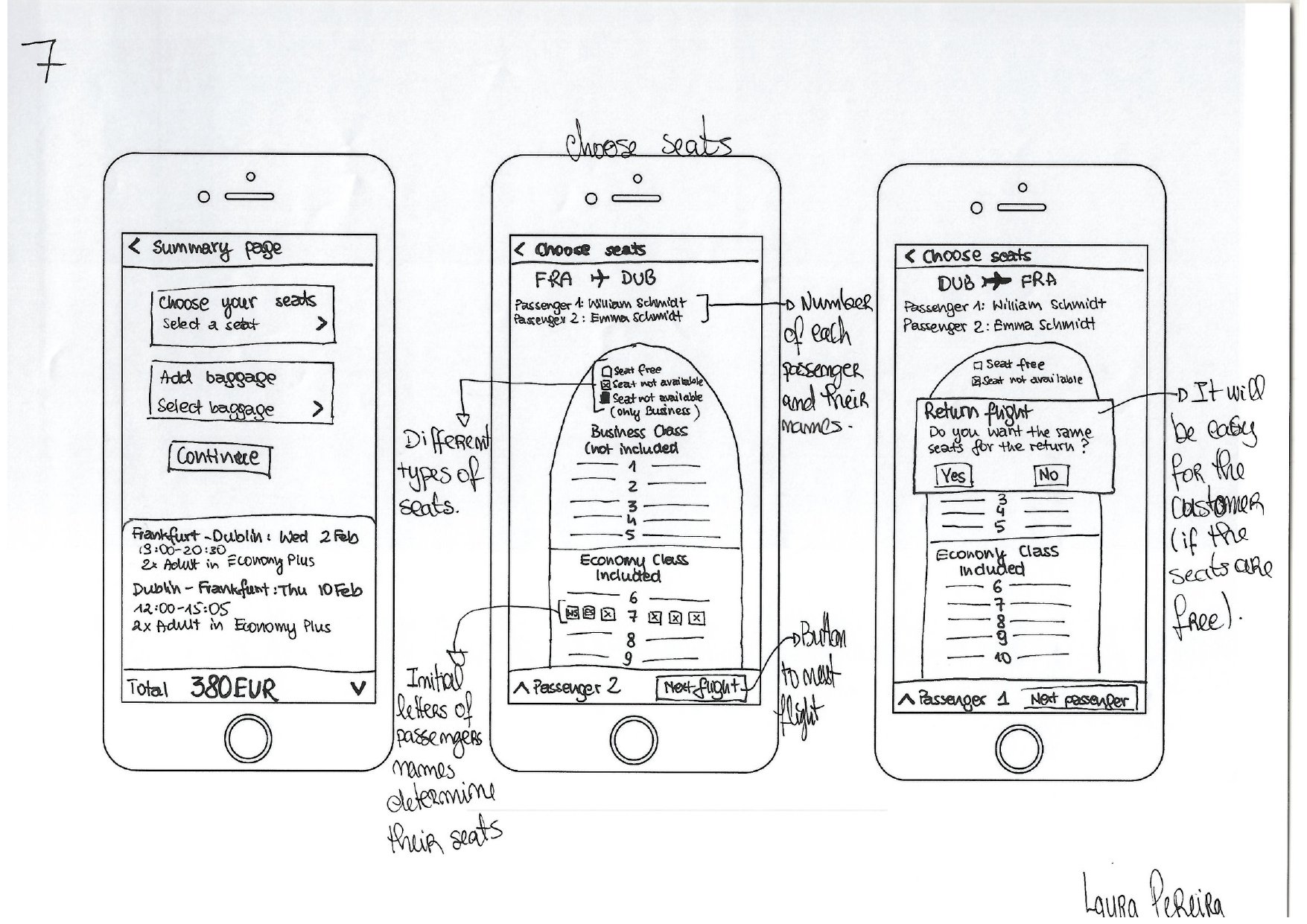
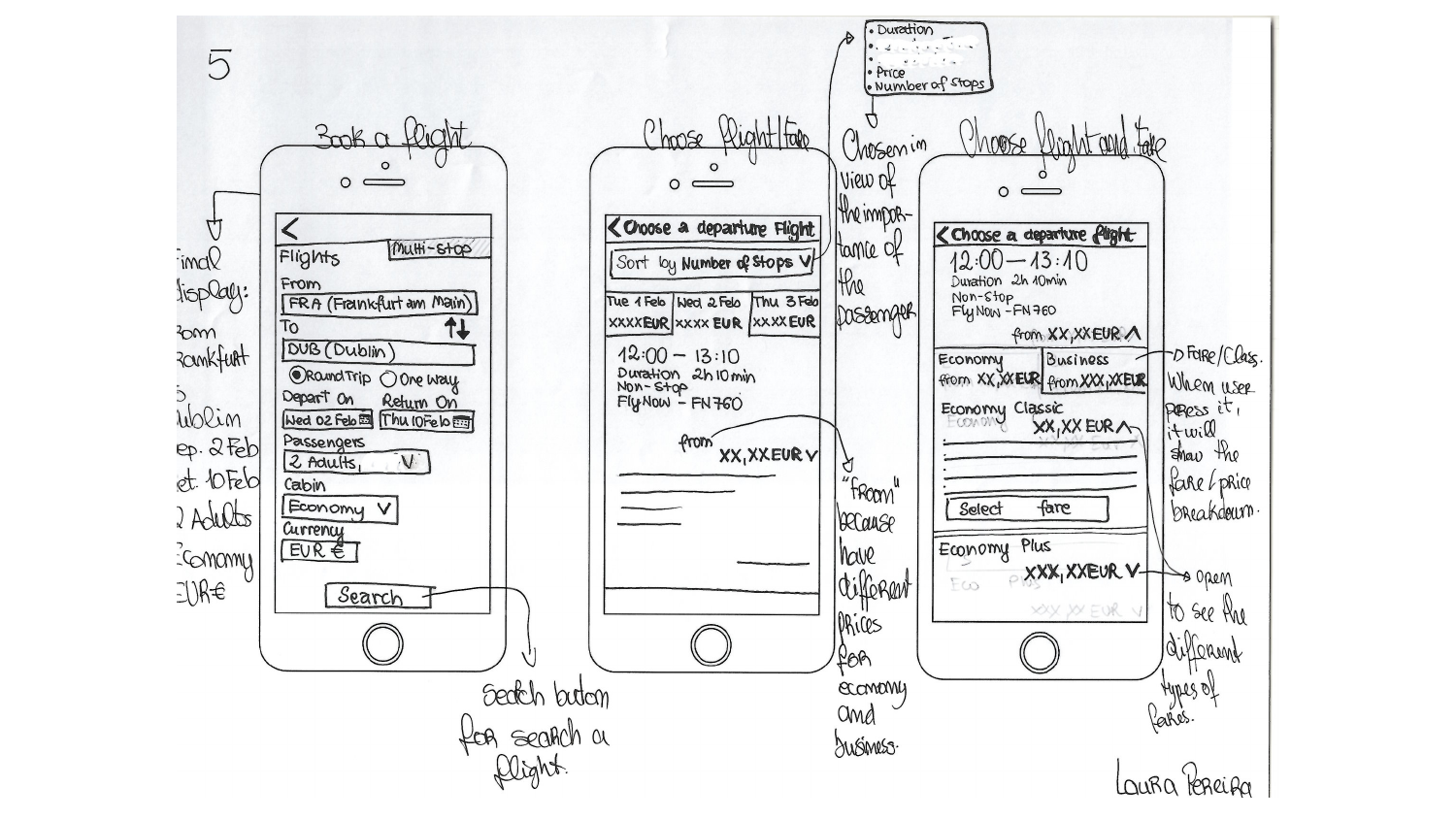
I moved from the flow to sketches of the screens and their different states. I explored how the interface could support the goals and issues identified during research, making the decisions tangible before building the digital prototype.
Explain the fare before selection. Both reviewed participants struggled with Aer Lingus’ fare names. In the original sketches, travellers can expand a fare and inspect its breakdown before choosing it.
Show the connection earlier. Both noticed the Eurowings connection only at seat selection. The original results and summary bring stops, duration, time and price into the flight decision.
Those sketches were not only a visual direction. They described what changes when an option is opened or selected, helping connect the flow diagram to the screen states I would need to prototype.
Design: build the original interactive prototype.
The final original phase brought the ideas into a medium-fidelity mobile prototype and a set of annotated wireframes. The aim was to simulate how a working booking app would behave, connecting the individual screens into an experience.
Prototype for mobile
1 week · Figma · 74 screen states
This was also a learning challenge: I was getting to know a new tool while creating 74 screen states in one week. The prototype let me work through the appearance and behaviour of the booking sequence, rather than leaving the ideas as separate static screens.
The original sequence covers guest entry, search, flight and fare choices, passenger details, seats, baggage and payment. It is the medium-fidelity work that followed the research and sketches, before the much later visual update.
The image shows the original mobile prototype in its design workspace, before the later visual redesign. No launch or measured usability improvement is claimed.

Try the original prototype
Explore the booking flow I created in Figma, from the first screen through the connected journey.
Original medium-fidelity prototype · Before the later visual redesign. If the preview cannot load, use “Open in Figma”.
Wireframes and developer annotations
2 days · Figma
The prototype showed the experience; the wireframes needed to explain how it should be built. I brought the previous work into a set of annotations covering the controls, rules and feedback a developer would need to implement the intended behaviour accurately.
These original examples explain guest entry, airport selection, and departure and return dates alongside the screens. They close the original four-phase process with the reasoning and interaction details still visible.
The original outcome was research, a prototype and its supporting specifications. The visual redesign below was a separate, much later exploration.

Much later, a new visual direction.
A later Figma draft explores clearer actions through the booking journey. It is untested and remains separate from my original research and prototype.
Routes, dates, fares, allowances and booking details are illustrative and retain the historical prototype context.
Screen walkthrough Figma testing draft · Exported screens, not a recording of a working app.
Make the next step clear.
The Figma testing draft keeps the example route, two adults and dates together, with an explicit Find flights action. This focused prototype uses fixed trip details.
Later Figma draft · Untested · Separate from my original research prototype.


Try the booking flow
Choose dates, compare fares, add example travellers and review the total—all here in the portfolio. Clear actions and visible selections explore the next step in this interaction proposal.
Later browser demo · Illustrative flights and prices · Untested · Separate from my original research prototype.
View the related Figma draftStart here to try the app inside the portfolio. No real booking, payment or message is sent.
A selected fare stays selected—and editable.
The Figma testing draft makes the selected fare explicit before continuing. Traveller details can be revisited from the review, with a clear return action and the booking context retained.
These are interaction proposals for testing. Changed prices and payment errors remain future scenarios to design and validate.


The research remains the measure for every visual change.
The work connects research, synthesis and interaction decisions. A more polished interface is a new proposal, not evidence that those decisions work better.
What I would validate next
- Can travellers explain the fare, total and any connection before committing?
- Do they recognise departure and return, and recover from changed prices or errors?
- Are touch targets, keyboard focus and error announcements usable in an interactive prototype?

Two stages of design work, not a before-and-after test result.
Original project sources
The previews above are genuine project artifacts. The complete PDFs retain their original wording and historical context.